Home
StatPlus 2007 Professional Help Prev Page Prev Page
StatPlus
License agreement
Support
What's New
Getting started
Loading program
Using Keyboard
Entering Data
Editing Data
Statistics
Analyzing Data
Bibliography
Elementary Concepts
Basic Statistics
Descriptive Statistics
Comparing Means
One Sample T-Test
F-Test Two-Sample for Variances
Linear Correlation (Pearson)
Fechner Correlation
Covariance
Normality Tests
Frequency Tables
Cross Tabulation
ANOVA
One-way ANOVA
Two-way and Three-way ANOVA
GLM ANOVA
Latin Squares Analysis
Regression
Linear Regression
Polynomial regression
Stepwise Regression
Binary logistic regression
Cox proportional-hazards regression
Nonparametric statistics
2x2 Tables
Rank Correlations
Comparing two independent samples
Comparing multiple independent samples
Comparing two dependent samples
Comparing multiple dependent samples
Cochran Q Test
Time Series/Forecasting
Autocorrelation and Partial AC
Moving Average
Interrupted Series Analysis
Survival Analysis
Cox proportional-hazards regression
Probit analysis
Charts
Control Charts
Tutorial On Chart Building
Function Reference
All Functions
Math
General
Statistical
Financial
Customizing StatPlus
General
View
Saving
Add-ons
Other
About AnalystSoft

Purpose

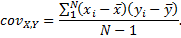
  Covariance is a measure of the relationship between two ranges of data. The Covariance analysis tool returns the average of the product of deviations of data points from their respective means.
 

Preparations

    Run StatisticsBasic Statistics and Tables→Covariation.... command.

Results

You can use the covariance tool to determine whether two ranges of data move together — that is, whether large values of one set are associated with large values of the other (positive covariance), whether small values of one set are associated with large values of the other (negative covariance), or whether values in both sets are unrelated (covariance near zero).

Note   To return the covariance for individual data point pairs, use the COVAR worksheet function.